


- New

Tu en as marre de construire ton menu à la main ?Auto Menu est le module PrestaShop qui transforme ton mega-menu en machine 100 % automatique. Plus besoin de glisser-déposer pendant des heures : il détecte tout seul tes catégories, sous-catégories et produits. Fait pour :
Tu installes, tu choisis 2-3 réglages, et en 5 minutes chrono ton mega-menu est en ligne : animations 3D, panneaux déroulants avec images, sous-catégories et produits qui s'affichent au survol, largeur du panneau réglable en px ou en % du menu… tout est paramétrable depuis le back-office. Ce que tu obtiens :
Arrête de perdre ton temps. Laisse Auto Menu bosser à ta place. → |

Module WebPoint
Auto Menu — Mega-menu automatique en 5 min
Je l'achète maintenant →
Compatible PrestaShop 1.7 / 8 / 9 |
 Online Stores
 Online Services
 Chrome Extensions
 PrestaShop Modules
 Sites web sur mesure
 Windows Applications
Reference: WP-VI-CON-V1
Brand: WebPoint
Reference: BOUT-93K2X
Brand: WebPoint
Reference: EXT-CRMAX-MULTILANG
Brand: WebPoint
Reference: EBP-2025-PRO
Brand: WebPoint
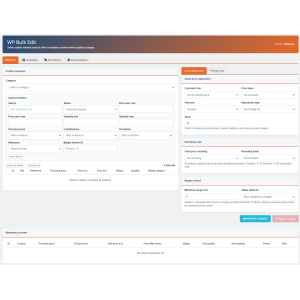
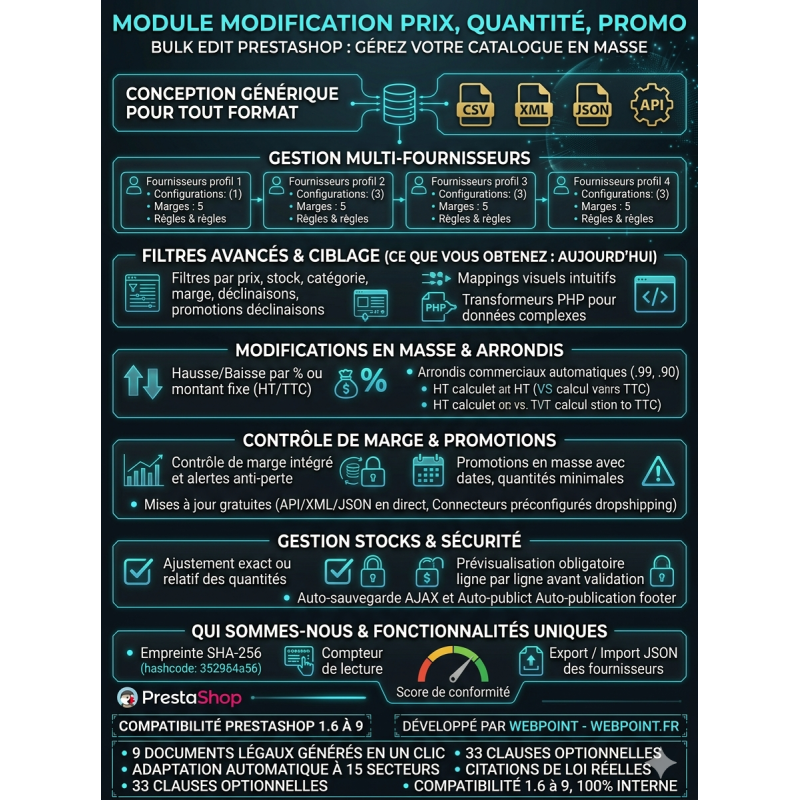
The PrestaShop Bulk Edit price modification module simplifies catalog management from a clear and secure interface.
Select a category, filter useful products, adjust prices or quantities, and create bulk promotions.
Commercial rounding, margin control, and mandatory preview limit errors before validation.
A practical solution to save time without manually editing each product page.
Bulk Edit allows you to quickly change prices, quantities, and promotions for multiple products from a centralized interface.Each operation requires a mandatory preview before application.
Editing each product listing one by one quickly becomes time-consuming as your catalog grows.Bulk Edit helps you select a category, display the corresponding products, and apply a consistent pricing strategy to the selected products.
The module is adapted to supplier price changes, seasonal operations, dropshipping imports, promotional campaigns, and regular stock adjustments.
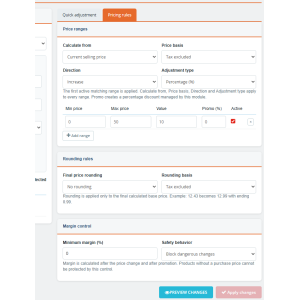
Increase or decrease prices by percentage or fixed amount.The calculation can start from the current selling price or the purchase price, with a pre-tax or including-tax basis.For complex catalogs, use tiered pricing rules to apply different adjustments based on the price level.
Apply a final rounding to 0.99, 0.90, or 0.95, or choose to round up or down to the nearest whole number.The calculation can be performed on the pre-tax or including-tax price to maintain a commercial presentation adapted to your shop.
The table displays the purchase price, the margin in euros, and the margin in percentage.Define a minimum margin and choose between a warning or blocking dangerous modifications.This limits your risk of selling at a loss during a price drop or promotion.
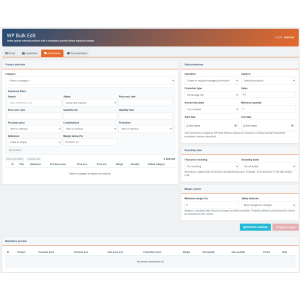
Create a percentage or fixed amount discount for selected products or for an entire category.You can define a start date, an end date, and a minimum quantity.The module also allows you to bulk delete only the promotions it created itself, without affecting existing manual promotions.
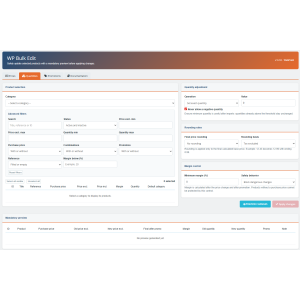
Set an exact quantity, add or remove from stock, or impose a minimum stock level.A protection prevents negative quantities.Products with variations are intentionally ignored during global stock adjustments to avoid overwriting quantities managed by combination.
The apply button remains disabled until a recent preview has been generated.You control the initial prices, new prices, result after promotion, remaining margin, quantities, and alerts line by line before confirming.
Bulk Edit uses stable PrestaShop APIs, without core overrides and without dependencies reserved for recent versions.It is designed to work from PrestaShop 1.6 up to PrestaShop 9.x.
Developed by WebPoint
 play_circle_filled
 play_circle_filled
 play_circle_filled
 play_circle_filled
Reference: WPUP-2023-V123
Brand: WebPoint
Reference: EXT-DEVINOX-2025-V1
Brand: WebPoint
Reference: EBP-2025-PRO
Brand: WebPoint
Reference: MOD-CUST-EXPO
Brand: WebPoint
Reference: WPSHT-2026
Brand: WebPoint
Reference: BOUTIQUE-ELEMTECHNIC
Brand: WebPoint
Reference: BOUTIQUE-RESERVOIRMODE
Brand: WebPoint
Reference: BOUTIQUE-DEBRANET
Introduction PrestaShop est une plateforme e-commerce puissante, mais sa configuration standard peut présenter des...
Lire la suite : Optimiser le SEO de PrestaShop : Guide complet pour booster votre visibilitéIntroduction Les images produits jouent un rôle clé dans la conversion en e-commerce, notamment sur une plateforme...
Lire la suite : Évitez ces erreurs pour optimiser vos images produits PrestaShop avec l'automatisation IAIntroduction : l'importance de la surveillance des fichiers pour la sécurité PrestaShop La sécurité de votre boutique...
Lire la suite : Sécurité PrestaShop : erreurs à éviter pour surveiller l’intégrité des fichiers et prévenir le piratage
The PrestaShop Bulk Edit price modification module simplifies catalog management from a clear and secure interface.
Select a category, filter useful products, adjust prices or quantities, and create bulk promotions.
Commercial rounding, margin control, and mandatory preview limit errors before validation.
A practical solution to save time without manually editing each product page.