



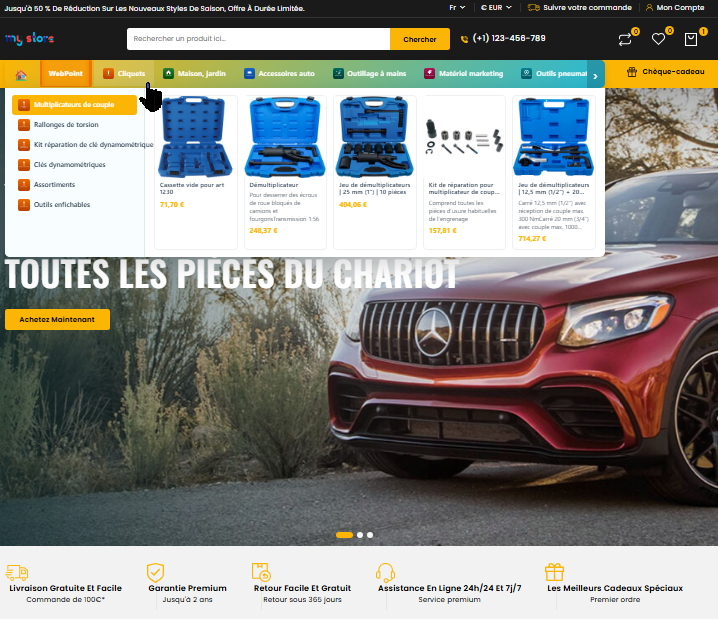
Tu en as marre de construire ton menu à la main ?Auto Menu est le module PrestaShop qui transforme ton mega-menu en machine 100 % automatique. Plus besoin de glisser-déposer pendant des heures : il détecte tout seul tes catégories, sous-catégories et produits. Fait pour :
Tu installes, tu choisis 2-3 réglages, et en 5 minutes chrono ton mega-menu est en ligne : animations 3D, panneaux déroulants avec images, sous-catégories et produits qui s'affichent au survol, largeur du panneau réglable en px ou en % du menu… tout est paramétrable depuis le back-office. Ce que tu obtiens :
Arrête de perdre ton temps. Laisse Auto Menu bosser à ta place. → |
Module WebPoint
Auto Menu — Mega-menu automatique en 5 min
Je l'achète maintenant →
Compatible PrestaShop 1.7 / 8 / 9 |
 Online Stores
 Online Services
 Chrome Extensions
 PrestaShop Modules
 Sites web sur mesure
 Windows Applications
Reference: WP-VI-CON-V1
Brand: WebPoint
Reference: BOUT-93K2X
Brand: WebPoint
Reference: EXT-CRMAX-MULTILANG
Brand: WebPoint
Reference: EBP-2025-PRO
Brand: WebPoint

OpenAI Banner Generator PrestaShop: optimizes your PrestaShop store with a clear, practical tool built to save time without adding complexity.
PrestaShop AI banners module - Product banner generator with OpenAI GPT Image.
PrestaShop AI banners module transforms your products into promotional visuals ready to display on your store.
From the back office, you choose a category, filter products, select those to highlight, then generate banners with OpenAI GPT Image templates.
The module allows you to set dimensions, style, colors, text, CTA, display hook, page scope, slider or grid mode, and position in the hook without leaving its configuration page.
Products that already have a banner are visually identified, creations are managed via Ajax, and DALL-E is deliberately excluded.
OpenAI Banner Generator PrestaShop: optimizes your PrestaShop store with a clear, practical tool built to save time without adding complexity.
PrestaShop AI banners module - Product banner generator with OpenAI GPT Image.
AI banners module PrestaShop for creating marketing visuals from your products
AI banners module PrestaShop is a comprehensive module designed to help merchants quickly produce commercial banners from the actual products in their catalog. It is not just an image generator: the module offers a real workspace to select products, define the visual style, generate banners with artificial intelligence, manage creations, choose their placement on the store, and control their display without navigating through multiple back-office pages.
The module is aimed at stores that want to create commercial operations more quickly: highlighting a product, category banner, homepage visual, seasonal campaign, one-off promotion, marketing slider, or enriched product image for a sales page. The goal is simple: to turn the data already present in PrestaShop into useful visual assets for selling.
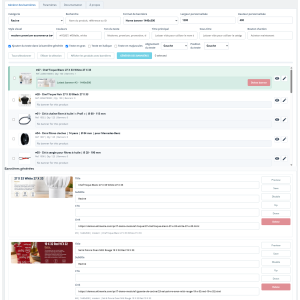
In the generation tab, the merchant selects a category, then the list of products appears with essential information: thumbnail, name, reference, quantity, and status. A search field allows filtering products by name, reference, or ID. Each product can be selected with a checkbox, allowing you to generate a banner for a single product or for several products in succession.
Products that already have a banner are automatically highlighted with a distinct background. This visual cue allows you to immediately spot products that have already been worked on. The module also displays the last banner generated for each relevant product, with a preview and a delete button. The merchant therefore does not need to open multiple screens to know which products already have a visual asset.
The module offers several common formats to meet the usual needs of an online store: large desktop banner, homepage banner, standard hero, wide promotion format, category banner, promotional square, mobile format, and vertical story-type format. A custom option also allows you to define the desired width and height. Dimensions are controlled on the module side to avoid dangerous or inconsistent values.
The merchant can choose a graphic direction according to the need: modern, minimalist, bold, luxury, technical, lifestyle, seasonal, or social. They can also specify colors, a main title, a subtitle, a call to action, text tone, alignment, approximate text position, bold, italic, or uppercase. These options allow you to create visuals consistent with a specific commercial operation, without having to write a complex prompt for each generation.
To build a relevant banner, the module uses product data: name, category, brand, reference, price, keywords, short description, and long description. When the option is enabled and the product has a main image, this image can be sent as a reference to the artificial intelligence model. This helps the generation stay closer to the actual product, while allowing the AI to create an advertising composition around it.
If a product does not have an image, generation is not blocked. The module then switches to generation guided by the available textual information. This approach avoids interruptions in the workflow and allows you to continue creating visual assets even for incomplete product sheets.
The module is designed to work with authorized GPT Image models. DALL-E models are deliberately excluded from the interface and blocked server-side. This rule limits configuration errors and ensures that the module remains aligned with the intended operation. The OpenAI API key is saved in the PrestaShop configuration, and calls are made via Ajax to maintain a smooth experience during generation.
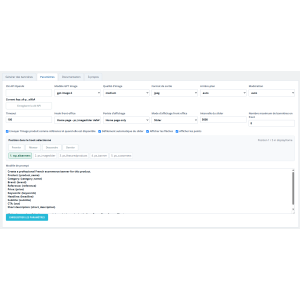
The available settings allow you to choose the GPT Image model, quality, output format, background, moderation, and timeout. The global prompt can also be modified from the Settings tab to adapt the module's behavior to the store's style.
After generation, banners are listed in the module. Each banner can be previewed, activated, deactivated, deleted, moved, or edited for its commercial information. The merchant can adjust the title, subtitle, CTA, and link after generation. Image files are stored in the module folder, while banner information is saved in a dedicated table.
This separation is important: the module does not modify the product images in the catalog. Generated banners remain independent marketing assets. Deleting a banner does not delete the original product image, and generating a banner does not add a new image to the product sheet.
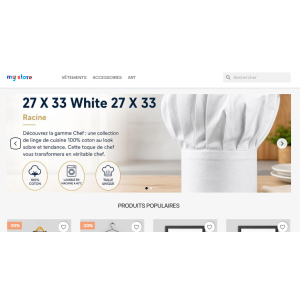
Banners can be displayed on the front office via several hooks compatible with PrestaShop themes. The recommended hook is displayHome, which corresponds to the classic location of a homepage slider. The module also offers other hooks such as displayBanner, displayTop, displayWrapperTop, displayContentWrapperTop, displayFooterBefore, displayFooter, displayFooterAfter, displayFooterProduct, displayFooterCategory, displayLeftColumn, or displayRightColumn.
The merchant can choose the display scope: homepage only, everywhere, category pages only, product pages only, categories and products, or everywhere except the checkout process. This prevents displaying a banner in the wrong place and gives precise control over campaign visibility.
The module allows you to change its position in the selected hook directly from its Settings tab. The merchant can place the module first, move it up, move it down, or place it last. There is no need to open the PrestaShop Positions page. The current position is displayed with the list of modules present in the hook, making it easier to adjust the display order.
This feature is particularly useful when several modules use the same hook: native slider, promotional blocks, carousels, reassurance modules, or custom sections. The merchant can quickly adjust the visual order from the module itself.
On the front office side, the module offers several display modes. The slider mode allows you to scroll through active banners with configurable interval, arrows, and navigation dots. The static mode displays the first active banner. The grid mode displays several banners in an organized layout. The maximum number of banners displayed on the front office is configurable.
Front-office CSS and JavaScript files are loaded via PrestaShop hooks, to ensure clean integration. The module does not create an admin controller and does not add a shortcut in the back-office side menu.
Main actions are performed via Ajax: loading products, generation, refreshing the list, deleting banners, activation, deactivation, editing, and moving. The merchant keeps the same page open while working. When a banner is generated, the product row is updated without a full reload. When a banner is deleted, the counter and preview are also updated.
This operation makes the module practical for processing several products in succession. It becomes possible to quickly prepare a series of marketing visuals, check already processed products, filter products with banners, and manage creations without losing context.
 play_circle_filled
 play_circle_filled
 play_circle_filled
 play_circle_filled
Reference: AI-PRO-IMAGE-PS
Brand: WebPoint
Reference: WPEBAY-FEEDBACK-PRO
Brand: WebPoint
Reference: WP-SEO-AI1
Brand: WebPoint
Reference: WPUP-2023-V123
Brand: WebPoint
Reference: WPCTX-1233-PR45
Brand: WebPoint
Reference: WPEL-1233-PR45
Brand: WebPoint
recaptcha google gratuit : sécurisez votre boutique prestashop efficacement Dans le contexte actuel du commerce en...
Lire la suite : recaptcha google gratuit : sécurisez votre boutique prestashop efficacementcréer theme prestashop 1.6 : Guide complet pour un design ecommerce performant Pour les marchands souhaitant...
Lire la suite : créer theme prestashop 1.6 : Guide complet pour un design ecommerce performantbig data exemple : Optimisez votre ecommerce avec l’analyse avancée Le big data exemple est devenu un levier...
Lire la suite : big data exemple : Optimisez votre ecommerce avec l’analyse avancéeÇa m'a bien aidé pour mes bannières
OpenAI Banner Generator PrestaShop - professional AI tool
Le module est conçu pour être compatible avec les dernières versions de PrestaShop. Vérifiez les notes de version pour plus de détails.
OpenAI Banner Generator PrestaShop: optimizes your PrestaShop store with a clear, practical tool built to save time without adding complexity.
PrestaShop AI banners module - Product banner generator with OpenAI GPT Image.
PrestaShop AI banners module transforms your products into promotional visuals ready to display on your store.
From the back office, you choose a category, filter products, select those to highlight, then generate banners with OpenAI GPT Image templates.
The module allows you to set dimensions, style, colors, text, CTA, display hook, page scope, slider or grid mode, and position in the hook without leaving its configuration page.
Products that already have a banner are visually identified, creations are managed via Ajax, and DALL-E is deliberately excluded.