Reference: WP-VI-CON-V1
Brand: WebPoint
Tu en as marre de construire ton menu à la main ?Auto Menu est le module PrestaShop qui transforme ton mega-menu en machine 100 % automatique. Plus besoin de glisser-déposer pendant des heures : il détecte tout seul tes catégories, sous-catégories et produits. Fait pour :
Tu installes, tu choisis 2-3 réglages, et en 5 minutes chrono ton mega-menu est en ligne : animations 3D, panneaux déroulants avec images, sous-catégories et produits qui s'affichent au survol, largeur du panneau réglable en px ou en % du menu… tout est paramétrable depuis le back-office. Ce que tu obtiens :
Arrête de perdre ton temps. Laisse Auto Menu bosser à ta place. → |
Module WebPoint
Auto Menu — Mega-menu automatique en 5 min
Je l'achète maintenant →
Compatible PrestaShop 1.7 / 8 / 9 |
Online Stores
Online Services
Chrome Extensions
PrestaShop Modules
Sites web sur mesure
Windows Applications
Reference: WP-VI-CON-V1
Brand: WebPoint
Reference: BOUT-93K2X
Brand: WebPoint
Reference: EXT-CRMAX-MULTILANG
Brand: WebPoint
Reference: EBP-2025-PRO
Brand: WebPoint
Free Data Converter, the perfect tool to quickly transform your files with ease.
WP Data Converter is a free 100% portable data converter for Windows.
No installation required: download, launch, convert!
Transform your CSV, JSON, XML, Excel (.xlsx), and YAML files with one click.
Additional export in SQL and HTML. Automatic detection of delimiters and encodings.
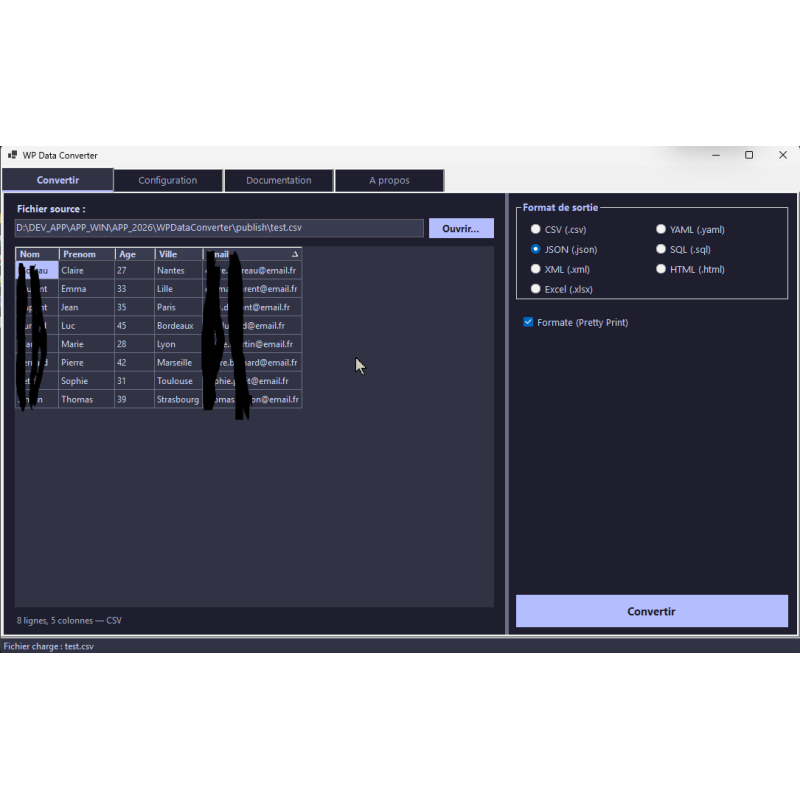
Preview data before conversion. Integration into the Windows context menu (right-click).
Drag & drop, direct conversion via command line. Lightweight, fast application, ad-free, no account, 100% free and unlimited use. WebPoint Suite.
Free Data Converter that allows you to convert multiple file formats like CSV, JSON, or Excel in just one click.
Le free data converter latest for Windows
CSV • JSON • XML • Excel • YAML • SQL • HTML
WP Data Converter is a free data converter portable for Windows that allows you to transform your tabular data files from one format to another in a single click.Whether you work with files CSV , JSON , XML , Excel (.xlsx) ou YAML , this application takes care of everything automatically.
No installation required: download the single executable, run it, and start converting immediately.The application is completely self-contained, without advertising, without user accounts, and 100% free with no limits .
Integrate to the WebPoint Suite , WP Data Converter offers a seamless user experience with its Catppuccin Mocha dark theme, a real-time preview of your data, and direct integration into the Windows Explorer context menu.
| Format | Extension | Description |
|---|---|---|
| 📊 CSV | .csv |
Comma-Separated Values - Universal Tabular Format |
| 📊 TSV | .tsv |
Tab-Separated Values |
| 📦 JSON | .json |
JavaScript Object Notation - Data Interchange Format |
| 📜 XML | .xml |
eXtensible Markup Language - Universal format structure |
| 📋 Excel | .xlsx |
Microsoft Excel - The most used spreadsheet in the world |
| 📝 YAML | .yaml |
YAML Ain't Markup Language - Readable configuration format |
| Format | Extension | Description |
|---|---|---|
| 📊 CSV | .csv |
Universal Tabular Export |
| 📦 JSON | .json |
Export structure for API and web |
| 📜 XML | .xml |
Export universal tagging |
| 📋 Excel | .xlsx |
Export Microsoft Excel spreadsheet |
| 📝 YAML | .yaml |
Export readable configuration |
| 🗂 SQL | .sql |
Export database with CREATE TABLE + INSERT |
| 🌐 HTML | .html |
Export web page with Catppuccin Mocha theme |
Convert your CSV exports to Excel for your reports, or transform Excel files to JSON for your APIs.
Convert your YAML configuration files to JSON, generate SQL scripts from CSV, or export to XML.
Prepare your data by converting between formats.Preview the conversion before finalizing to check the structure.
Free and portable tool, ideal for course projects.No installation, works on any Windows PC.
All possible conversions in one click
| From \ To | CSV | JSON | XML | Excel | YAML | SQL | HTML |
|---|---|---|---|---|---|---|---|
| CSV / TSV | - | ✔ | ✔ | ✔ | ✔ | ✔ | ✔ |
| JSON | ✔ | - | ✔ | ✔ | ✔ | ✔ | ✔ |
| XML | ✔ | ✔ | - | ✔ | ✔ | ✔ | ✔ |
| Excel | ✔ | ✔ | ✔ | - | ✔ | ✔ | ✔ |
| YAML | ✔ | ✔ | ✔ | ✔ | - | ✔ | ✔ |
✔ Green = Bidirectional conversion | ✔ Orange = Export only (SQL, HTML)
| Platform | Windows 10 / 11 (x64) |
| ⚙ Technology | .NET 8.0, C# WinForms, Self-Contained |
| 📦 Type | Portable Application - Single EXE File |
| 💾 Installation | No installation required |
| 💰 Price | 100% Free - No Limits |
| 🎨 Theme | Catppuccin Mocha (dark theme), accent Lavender |
| 📚 Libraries | ClosedXML 0.102.3 (Excel), YamlDotNet 16.1.3 (YAML) |
| Lecture formats | CSV, TSV, JSON, XML, Excel (.xlsx), YAML |
| Writing Formats | CSV, JSON, XML, Excel (.xlsx), YAML, SQL, HTML |
| 📷 Interface | 4 tabs, Drag & Drop, DataGridView Preview |
🚀 Be part of the WebPoint Suite
Free, portable, and powerful tools for Windows
play_circle_filled
play_circle_filled
play_circle_filled
play_circle_filled
Reference: WP-BAT-RENM
Brand: WebPoint
Reference: WP-VID-CONV
Brand: WebPoint
Reference: WP-PDF-TOOL
Brand: WebPoint
Reference: mic1695935434030
Brand: WebPoint
Reference: WP-AUD-CONV
Brand: WebPoint
Reference: WP-ARC-HIVR
Brand: WebPoint
Introduction : Optimiser l'automatisation du catalogue fournisseur sur PrestaShop Le dropshipping sur PrestaShop...
Lire la suite : Dropshipping PrestaShop : Évitez ces erreurs pour une importation et synchronisation réussies de votre catalogue fournisseurIntroduction : Pourquoi une navigation efficace est cruciale pour votre boutique PrestaShop Une navigation claire et...
Lire la suite : Optimiser votre navigation PrestaShop : Guide complet pour un menu clair et automatiqueIntroduction : Optimiser la navigation catalogue pour une boutique performante Une navigation claire et bien...
Lire la suite : Navigation PrestaShop : Évitez ces erreurs pour un méga-menu clair et efficaceFree Data Converter - WP Data Converter
WP Data Converter est compatible avec Windows 10 et 11 (x64). Aucune installation n'est requise, mais assurez-vous que votre système dispose de .NET 8.0 pour exécuter l'application.
WP Data Converter est une application portable. Téléchargez simplement le fichier exécutable unique (EXE) et placez-le dans le répertoire de votre choix. Vous pouvez également l'exécuter directement depuis une clé USB ou un disque dur externe.
Les préférences de l'application sont automatiquement sauvegardées et restaurées à chaque lancement. Utilisez les quatre onglets organisés pour naviguer et configurer vos options de conversion.
WP Data Converter offre une visualisation DataGridView des données avant conversion, limitée à 1000 lignes pour des raisons de performance. Cela permet une vérification visuelle avant l'export.
Si vous rencontrez des problèmes lors de l'utilisation de WP Data Converter, assurez-vous que votre système est à jour et que .NET 8.0 est correctement installé. Vérifiez également que le fichier source est dans un format supporté.
WP Data Converter prend en charge les formats de lecture suivants : CSV, TSV, JSON, XML, Excel (.xlsx), YAML, et les formats d'écriture suivants : CSV, JSON, XML, Excel, YAML, SQL, HTML.
Free Data Converter, the perfect tool to quickly transform your files with ease.
WP Data Converter is a free 100% portable data converter for Windows.
No installation required: download, launch, convert!
Transform your CSV, JSON, XML, Excel (.xlsx), and YAML files with one click.
Additional export in SQL and HTML. Automatic detection of delimiters and encodings.
Preview data before conversion. Integration into the Windows context menu (right-click).
Drag & drop, direct conversion via command line. Lightweight, fast application, ad-free, no account, 100% free and unlimited use. WebPoint Suite.