

Reference: WP-VI-CON-V1

Brand: WebPoint

WebPoint Video Product Pro PrestaShop - professional WebPoint solution

star star star star star
(1)
WebPoint Video Product Pro PrestaShop: optimizes your PrestaShop store with a clear, practical tool built to save time without adding complexity. WebPoint Video Product Pro delivers professional videos to elevate your product listings and drive sales. Générateur vidéo produit automatisé Générateur vidéo produit automatisé Transform your products into...
€10.00
More
In stock

Reference: BOUT-93K2X

Brand: WebPoint

Turnkey Ecommerce Website - ready ecommerce solution

Turnkey Ecommerce Website: provides a professional ecommerce base for merchants who want to launch faster with a clear online store. Turnkey ecommerce website - for entrepreneurs. Launch your professional online store with ease and efficiency.Get your turnkey online store within 48 hours, fully configured and ready to welcome your first customers....
---
In stock

Reference: EXT-CRMAX-MULTILANG

Brand: WebPoint

Crunchyroll Skip Intro Chrome - free Chrome extension

star star star star star_half
(5)
Crunchyroll Skip Intro Chrome: improves browsing workflows with a simple Chrome extension built to save time on daily online tasks. Crunchyroll Maximizer Chrome Extension boosts your streaming quality effortlessly.Free and powerful Crunchyroll extension Download Crunchyroll Revolutionary 100% FREE Chrome extension that transforms your Crunchyroll experience!
---
In stock

Reference: EBP-2025-PRO

Brand: WebPoint

eBay Assistant Pro Chrome AI - free Chrome extension

star star star star star_half
(228)
eBay Assistant Pro Chrome AI: improves browsing workflows with a simple Chrome extension built to save time on daily online tasks. eBay extension automated by artificial intelligence ✨ eBay Assistant Pro is much more than a simple Chrome extension - it's your intelligent assistant dedicated to creating eBay listings that maximize your sales potential. 🚀...
€5.00
More
In stock
All best sellers
PrestaShop price management module, prices, promotions, CSV, API, multi-supplier
  • PrestaShop price management module, prices, promotions, CSV, API, multi-supplier
  • dashboard, user interface, software, price adjustment
  • user interface, price adjustment, settings, options, e-commerce
  • user interface, software, management, inventory, products, prices
  • system, software, interface, editing, product, management

Bulk Edit Price Quantity PrestaShop - professional admin module

WP-BULKEDT
WebPoint

Bulk Edit Price Quantity PrestaShop: optimizes your PrestaShop store with a clear, practical tool built to save time without adding complexity.

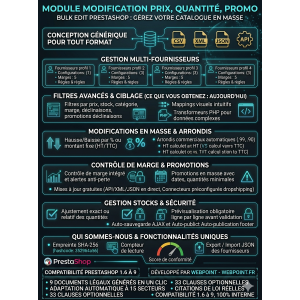
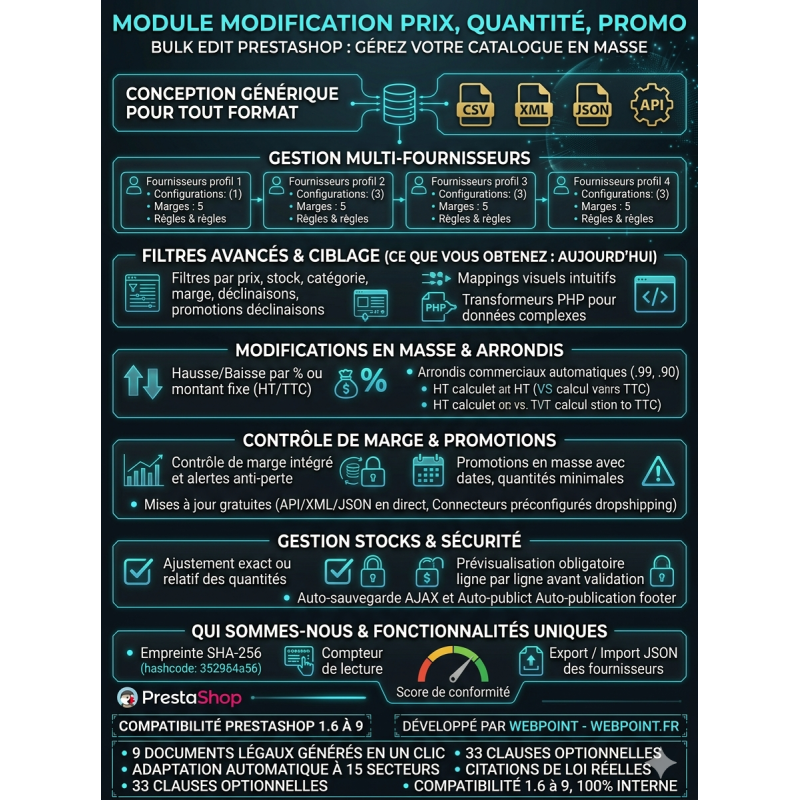
Bulk Price Modification Module allows for efficient pricing adjustments and promotion management on PrestaShop.

The PrestaShop Bulk Edit price modification module simplifies catalog management from a clear and secure interface.

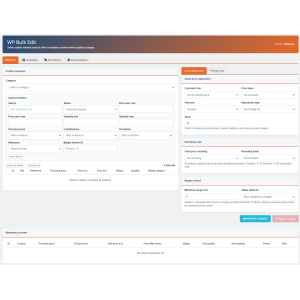
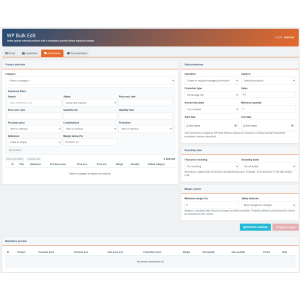
Select a category, filter useful products, adjust prices or quantities, and create bulk promotions.

Commercial rounding, margin control, and mandatory preview limit errors before validation.

A practical solution to save time without manually editing each product page.

€39.00
Tax excluded
Quantity
9999 Items

Description

Bulk Edit Price Quantity PrestaShop: optimizes your PrestaShop store with a clear, practical tool built to save time without adding complexity.

Bulk Price Modification Module simplifies the process of adjusting prices, managing stock, and handling promotions for your store.

PrestaShop Bulk Price Modification Module

Bulk Edit allows you to quickly change prices, quantities, and promotions for multiple products from a centralized interface.Each operation requires a mandatory preview before application.

Manage your catalog more efficiently

Editing each product listing one by one quickly becomes time-consuming as your catalog grows.Bulk Edit helps you select a category, display the corresponding products, and apply a consistent pricing strategy to the selected products.

The module is adapted to supplier price changes, seasonal operations, dropshipping imports, promotional campaigns, and regular stock adjustments.

Advanced filters to target the right products

  • Search by title, reference, or ID.
  • Filter by minimum and maximum price.
  • Filter by minimum and maximum quantity.
  • Active or inactive products.
  • Products with or without purchase price.
  • Products with or without variations.
  • Products with or without promotion.
  • Empty or filled references.
  • Products whose margin is below the chosen threshold.

Bulk price editing

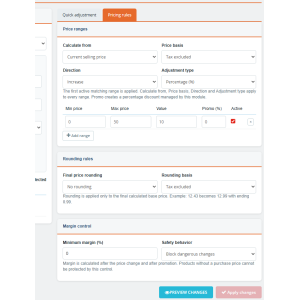
Increase or decrease prices by percentage or fixed amount.The calculation can start from the current selling price or the purchase price, with a pre-tax or including-tax basis.For complex catalogs, use tiered pricing rules to apply different adjustments based on the price level.

Automatic business rounding

Apply a final rounding to 0.99, 0.90, or 0.95, or choose to round up or down to the nearest whole number.The calculation can be performed on the pre-tax or including-tax price to maintain a commercial presentation adapted to your shop.

Integrated Margin Control

The table displays the purchase price, the margin in euros, and the margin in percentage.Define a minimum margin and choose between a warning or blocking dangerous modifications.This limits your risk of selling at a loss during a price drop or promotion.

Bulk Promotions

Create a percentage or fixed amount discount for selected products or for an entire category.You can define a start date, an end date, and a minimum quantity.The module also allows you to bulk delete only the promotions it created itself, without affecting existing manual promotions.

Quantity Management

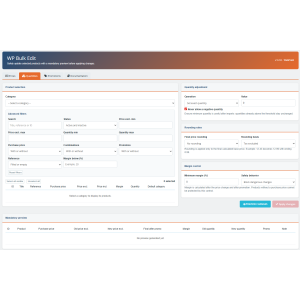
Set an exact quantity, add or remove from stock, or impose a minimum stock level.A protection prevents negative quantities.Products with variations are intentionally ignored during global stock adjustments to avoid overwriting quantities managed by combination.

Preview required before confirmation

The apply button remains disabled until a recent preview has been generated.You control the initial prices, new prices, result after promotion, remaining margin, quantities, and alerts line by line before confirming.

Compatibility

Bulk Edit uses stable PrestaShop APIs, without core overrides and without dependencies reserved for recent versions.It is designed to work from PrestaShop 1.6 up to PrestaShop 9.x.

Developed by WebPoint
Product Details
WP-BULKEDT
9999 Items
  • Front office play_circle_filled

    Front office

  • Back office play_circle_filled

    Back office

  • Ebay-assistant play_circle_filled

    Ebay-assistant

  • CSV Import Master Pro Busyx : AI-Powered E-Commerce Revolution play_circle_filled

    CSV Import Master Pro Busyx : AI-Powered E-Commerce Revolution

8 other products in the same category:

Reference: WP-Guard

Brand: WebPoint

Catalog Control PrestaShop Module - free WebPoint module

Catalog Control PrestaShop Module: optimizes your PrestaShop store with a clear, practical tool built to save time without adding complexity. Free PrestaShop Catalog Control Module streamlines product management and alerts you before publication.Guard is a free PrestaShop catalog control module designed to prevent dangerous or incomplete product sheets....
---
In stock

Reference: MOD-CUST-EXPO

Brand: WebPoint

Customer Export CSV PrestaShop - professional WebPoint solution

Customer Export CSV PrestaShop: optimizes your PrestaShop store with a clear, practical tool built to save time without adding complexity. CSV customer export PrestaShop simplifies the management of customer data with effective export solutions.Simplified PrestaShop CSV customer export Customer database export module for PrestaShop. Allows exporting...
€5.00
More
In stock

Reference: WP-QUICKLINKS-PRO

Brand: WebPoint

Quick Links Back Office PrestaShop - professional WebPoint solution

Quick Links Back Office PrestaShop: optimizes your PrestaShop store with a clear, practical tool built to save time without adding complexity. Innovative and high-performance PrestaShop shortcuts ⚡ Transform your PrestaShop back-office into a real control cockpit ! Quick Links adds an elegant side panel with all your favorite shortcuts, accessible in 1...
€9.00
More
In stock

Reference: CLR-CART-M01

Brand: WebPoint

Clear Cart Pro PrestaShop - professional WebPoint solution

star star star star star_half
(2)
Clear Cart Pro PrestaShop: optimizes your PrestaShop store with a clear, practical tool built to save time without adding complexity. Clear PrestaShop cart quickly Module to clear the cart in 1 click! 2 strategic buttons (header + cart) for an optimal customer experience. Simple installation, compatible with all PrestaShop versions.
€9.00
More
In stock

Reference: ANTI-PIRATE

Brand: WebPoint

PrestaShop File Integrity Monitoring - professional marketing tool

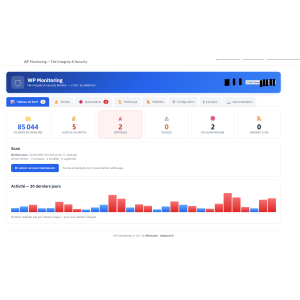
PrestaShop File Integrity Monitoring: optimizes your PrestaShop store with a clear, practical tool built to save time without adding complexity. PrestaShop file integrity monitoring protects your online store from unauthorized changes and threats.PrestaShop Anti-piracy PHP/HTML File Integrity Monitoring Module for PrestaShop. Detects additions,...
€79.00
More
In stock

Reference: ELEM-2023-PRO1

Brand: WebPoint

ELEM CSV Import Pro PrestaShop - professional WebPoint solution

star star star star star
(3)
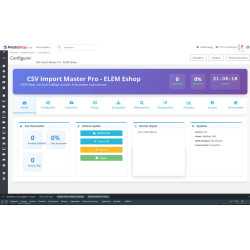
ELEM CSV Import Pro PrestaShop: optimizes your PrestaShop store with a clear, practical tool built to save time without adding complexity. CSV Import ELEM Module enhances your e-commerce efficiency by optimizing product data management.Simplified CSV product synchronization Revolutionize your e-commerce data import with CSV ELEM Eshop Import Master Pro!...
€79.99
More
In stock

Reference: WPBX-9872-PR45

Brand: WebPoint

Busyx CSV Import Pro PrestaShop - professional WebPoint solution

star star star star star_half
(5)
Busyx CSV Import Pro PrestaShop: optimizes your PrestaShop store with a clear, practical tool built to save time without adding complexity. CSV Import Pro Busyx simplifies your PrestaShop import process effortlessly for better management.Automated and secure CSV import for PrestaShop Revolutionize your product import with CSV Import Master Pro Busyx! 🚀 An...
€79.99
More
In stock

Reference: MOD-ORDE-REFE

Brand: WebPoint

Order Reference PrestaShop Module - professional WebPoint solution

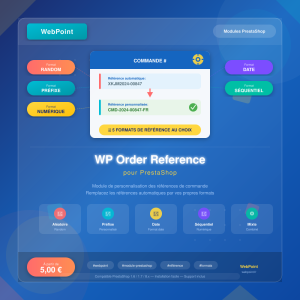
Order Reference PrestaShop Module: optimizes your PrestaShop store with a clear, practical tool built to save time without adding complexity. Order Reference for PrestaShop customizes your order references with unique IDs for streamlined management.PrestaShop custom order reference module Order reference customization module for PrestaShop. Replaces...
€5.00
More
In stock

Articles du blog

Tout voir arrow_forward

help_outline Questions fréquentes 6 FAQ

Non, le module intègre une sécurité essentielle : la prévisualisation obligatoire avant toute application. Le bouton de validation reste désactivé tant que vous n'avez pas généré une prévisualisation récente. Vous pouvez ainsi contrôler ligne par ligne les prix initiaux, les nouveaux prix, les marges restantes et les éventuelles alertes avant de confirmer. De plus, le contrôle de marge intégré peut être configuré pour bloquer automatiquement toute modification qui ferait passer votre marge en dessous d'un seuil que vous définissez. Vous travaillez donc en toute sérénité.
Oui, Bulk Edit a été conçu pour fonctionner sur une très large gamme de versions, de PrestaShop 1.6 jusqu'à PrestaShop 9.x. Le module utilise les API stables de PrestaShop, sans override du cœur et sans dépendance réservée aux versions récentes. Quelle que soit votre version actuelle, vous pouvez l'installer en toute confiance.
Le module gère intelligemment les produits avec déclinaisons. Pour les modifications de prix et les promotions, les déclinaisons sont prises en compte. En revanche, pour les ajustements de stock globaux, les produits avec déclinaisons sont volontairement ignorés afin d'éviter d'écraser des quantités gérées par combinaison. Cette approche protège l'intégrité de votre gestion de stock par variante. Vous pouvez également filtrer spécifiquement les produits avec ou sans déclinaisons grâce aux filtres avancés.
Absolument, c'est exactement le type d'opération pour lequel Bulk Edit a été conçu. Vous sélectionnez la catégorie souhaitée, définissez une réduction de 20% en pourcentage, et vous pouvez même préciser une date de début et une date de fin pour automatiser la période promotionnelle. Une fois la promotion terminée, le module vous permet de supprimer en masse uniquement les promotions qu'il a lui-même créées, sans toucher aux promotions manuelles que vous auriez configurées par ailleurs. Tout est prévisualisé avant validation pour éviter toute erreur.
Oui, c'est l'un des cas d'usage principaux du module. Vous pouvez filtrer les produits par catégorie, par référence ou par tranche de prix, puis appliquer une augmentation de 5% en pourcentage basée sur le prix de vente actuel ou sur le prix d'achat. Pour les catalogues complexes, vous pouvez même utiliser les règles tarifaires par tranches afin d'appliquer des ajustements différents selon le niveau de prix. Les arrondis commerciaux automatiques (en 0,99, 0,90 ou 0,95) vous permettent de conserver une présentation tarifaire professionnelle après la modification.
Oui, Bulk Edit intègre un contrôle de marge complet. Le tableau de prévisualisation affiche pour chaque produit le prix d'achat, la marge en euros et la marge en pourcentage. Vous pouvez définir un seuil de marge minimale et choisir entre deux comportements : un simple avertissement visuel qui vous alerte sur les produits à risque, ou un blocage ferme qui empêche toute modification faisant passer la marge en dessous du seuil défini. Ce filet de sécurité vous protège efficacement contre les ventes à perte, que ce soit lors d'une baisse de prix ou d'une campagne promotionnelle.

description Documentation produit

Bulk Edit Price Quantity PrestaShop - professional admin module

Prérequis

Assurez-vous que votre installation de PrestaShop est en version 1.6 ou ultérieure, jusqu'à la version 9.x. Aucune dépendance particulière n'est requise en dehors des API stables de PrestaShop.

Installation

  1. Téléchargez le fichier du module Bulk Edit depuis votre espace client WebPoint.
  2. Connectez-vous à votre interface d'administration PrestaShop.
  3. Accédez à la section "Modules et Services".
  4. Cliquez sur "Ajouter un nouveau module" et chargez le fichier téléchargé.
  5. Installez le module en suivant les instructions à l'écran.

Configuration

Après l'installation, accédez à la configuration du module via la section "Modules et Services" dans votre administration PrestaShop. Configurez les paramètres suivants selon vos besoins :

  • Définissez les arrondis commerciaux souhaités pour les prix.
  • Paramétrez le contrôle de marge en définissant une marge minimale.

Utilisation

  1. Ouvrez le module Bulk Edit depuis votre interface d'administration.
  2. Sélectionnez une catégorie de produits pour afficher les produits correspondants.
  3. Utilisez les filtres avancés pour cibler les produits à modifier.
  4. Ajustez les prix, quantités ou promotions selon vos besoins.
  5. Générez une prévisualisation obligatoire pour vérifier les modifications.
  6. Appliquez les modifications une fois la prévisualisation validée.

Scénarios d'usage

  • Changements de tarifs suite à une mise à jour des prix fournisseurs.
  • Création de promotions saisonnières sur une catégorie entière.
  • Ajustements de stock réguliers pour maintenir des niveaux optimaux.

Dépannage

Si le module ne fonctionne pas comme prévu, vérifiez que votre version de PrestaShop est compatible. Assurez-vous également que toutes les prévisualisations sont générées et validées avant l'application des modifications.

Compatibilité

Le module Bulk Edit est compatible avec PrestaShop 1.6 jusqu'à la version 9.x. Il utilise les API stables de PrestaShop et n'implique aucun override du cœur du système.

Bonnes pratiques

  • Effectuez régulièrement des sauvegardes de votre base de données avant d'appliquer des modifications en masse.
  • Utilisez les filtres avancés pour cibler précisément les produits à modifier.
  • Vérifiez toujours la prévisualisation pour éviter les erreurs de modification.