


Reference: WP-VI-CON-V1

Brand: WebPoint

WebPoint Video Product Pro - PRESTASHOP Video Creator Module

star star star star star
(1)
WebPoint Video Product Pro delivers professional videos to elevate your product listings and drive sales. Générateur vidéo produit automatisé Générateur vidéo produit automatisé Transform your products into professional videos automatically! 🎥 WebPoint Video Product Pro generates captivating advertising videos, multilingual narration, music and visual...
€10.00
More
In stock

Reference: BOUT-93K2X

Brand: WebPoint

Turnkey ecommerce website - Your Complete E-commerce Solution

Turnkey ecommerce website - for entrepreneurs. Launch your professional online store with ease and efficiency.Get your turnkey online store within 48 hours, fully configured and ready to welcome your first customers. Professional and modern design, optimized for all screens. Credit card and PayPal payments already set up, shipping configured with major...
---
In stock

Reference: EXT-CRMAX-MULTILANG

Brand: WebPoint

Crunchyroll Maximizer Chrome Extension - Ultimate Streaming Upgrade 2025

star star star star star_half
(5)
Crunchyroll Maximizer Chrome Extension boosts your streaming quality effortlessly.Free and powerful Crunchyroll extension Download Crunchyroll Revolutionary 100% FREE Chrome extension that transforms your Crunchyroll experience!
---
In stock

Reference: EBP-2025-PRO

Brand: WebPoint
EBay Assistant Pro for Listings - Your Smart AI Tool for eBay Success

star star star star star_half
(228)
EBay Assistant Pro for Listings - offers smart automation for your eBay listings, enhancing your efficiency and sales performance.eBay extension automated by artificial intelligence ✨ eBay Assistant Pro is much more than a simple Chrome extension - it's your intelligent assistant dedicated to creating eBay listings that maximize your sales potential. 🚀...
€5.00
More
In stock
All best sellers
dashboard, user interface, web application, chart
  • dashboard, user interface, web application, chart
  • user interface, configuration, software, digital, screen
  • dashboard, history, statistics, sessions, PrestaShop
  • user interface, software, settings, tools, needs
  • user interface, settings, dashboard, configuration, software

Cache clearance, Warmer Pro - Automatic PrestaShop cache warming

clearance
WebPoint

Cache clearance, Speed up your PrestaShop store by automatically visiting every page before your customers do.The cache is ready, pages load instantly.

Zero server configuration required - install, launch, it's fast.

€29.00
Tax excluded
Quantity
9999 Items

Description
Cache clearance détaille Warmer Pro - Automatic PrestaShop cache warming avec une description structurée, distincte et centrée sur le produit.

🔥 Cache clearance, Warmer Pro

Your pages are ready even before your customers arrive.

Compatible PrestaShop 1.6 • 1.7 • 8.x • 9.x

⚠ The issue you are aware of

When a visitor arrives on a page that is not cached , PrestaShop must recalculate everything: SQL queries, Smarty compilation, module calls... Result: 3 to 8 seconds loading .

The following visitor benefits from the already generated cache and the page is displayed in less than a second .But the first visitor? He has already left.

📈 53% of visitors leave a site that takes more than 3 seconds to load. (Source: Google)

✅ The solution: Cache clearance, Warmer Pro

Cache clearance, Warmer Pro visit automatically every page of your shop via cURL before your real visitors arrive.PrestaShop generates the cache for each visited page.

Result: 100% of your pages are served from cache .The first visitor has the same experience as the thousandth instant .

🛠 How does it work?

Collection

The module retrieves all URLs from your shop from the PrestaShop database.No external crawl.

Visit

Each URL is visited via cURL.PrestaShop generates the page and writes the cache (Smarty, FileSystem, etc.).

Snapshot

Your real visitors arrive on already cached pages.Ultra-fast loading, increased conversions.

🎯 Key Features

🔥 Warming complete - Visit all site URLs in one click: products, categories, CMS, manufacturers, suppliers, homepage.
Urgent mode - Only revisit pages modified since the last warming.Ideal after a catalog update.
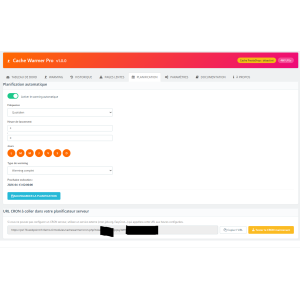
CRON Scheduling Schedule a daily or weekly automatic warming.Your cache is always fresh, without intervention.
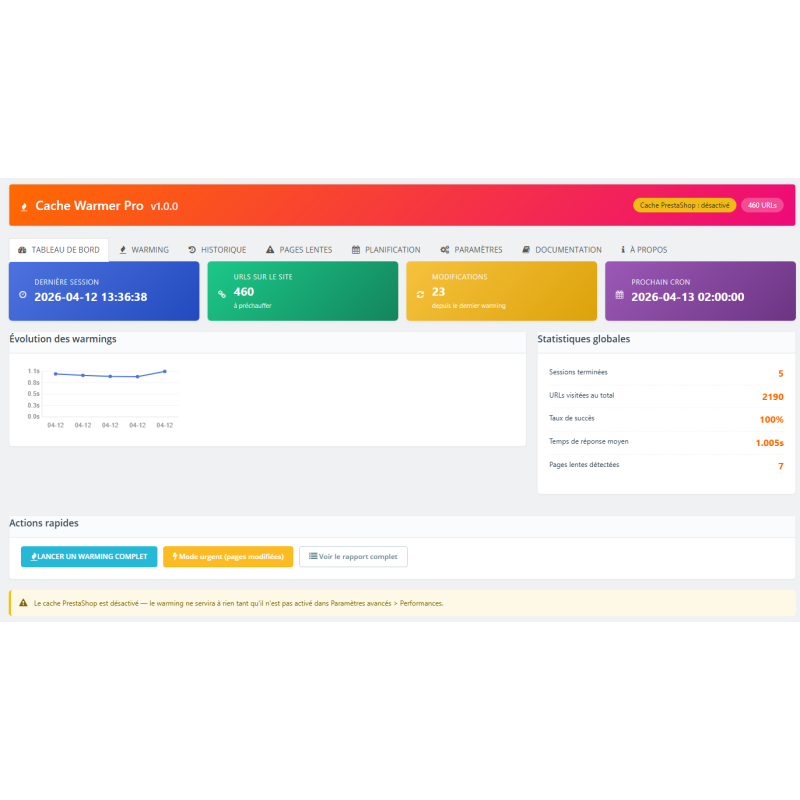
📊 Complete dashboard - Trend chart, global statistics, pending changes detection.
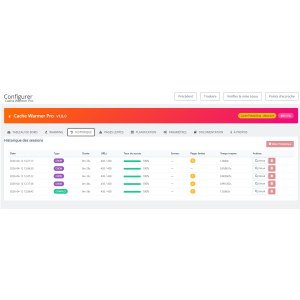
📐 Session History - Each warming is recorded with its success rate, errors, slow pages, and average response time.
🐢 Slow Page Detection - Top 20 slowest pages across all your sessions.Identify bottlenecks.
📧 Notifications email - Report sent at the end of each warming + alerts if the error rate exceeds your threshold.
🔒 Secure Cron - URL protected by a unique 32-character token.Cannot trigger a warming without authorization.
📷 Server Pre-check - Before each warming, check that your server is responding and that the PrestaShop cache is enabled.
🌐 Multi-language & Multi-store - Visit every page in all active languages.Compatible multi-shop PrestaShop.
🚫 Blacklist - Exclude entire URLs or patterns (e.g., */cart*, */search*).Supports wildcards.
🔄 Pause / Resume - Pause at any time and resume exactly where you left off.Nothing is lost.

📺 Real-time tracking

During the warm-up, you see everything live:

438 / 438
Visited URLs
100%
Success Rate
0.72s
Average time
0
Slow Pages

⚙ Configurable down to the smallest detail

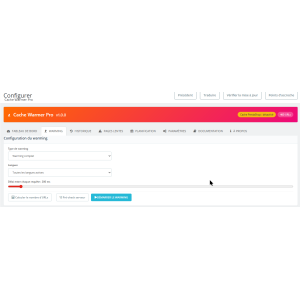
  • 🎮 Batch size : 5, 10, 20, or 50 URLs per AJAX call
  • Request interval : 0 to 5000ms (slider)
  • Timeout by URL : 10, 20, 30 or 60 seconds
  • 🐢 Slow Page Threshold : configurable in seconds
  • 💻 Customizable User-Agent or Chrome simulation
  • 📱 Desktop Mode / Mobile Mode / Both
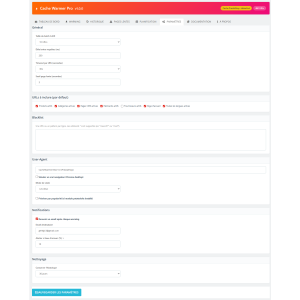
  • 📧 Email after each warming with HTML report
  • 🚨 Error Rate Alert exceeds a threshold
  • 📅 Historical Retention : 7, 30, 90 days or unlimited
  • 🚫 Blacklist by Pattern with wildcards *
  • URL Type Selection include/exclude
  • 📈 Sort by popularity (most viewed pages first)

🛠 Technical Specifications

Version 1.0.0
Compatibility PrestaShop 1.6.0.0 → 9.x
Dependencies None - 100% Native PHP + cURL
Multi-store Yes
Multilingual Yes - visit every page in every language
Interface 100% AJAX - no page reload
CRON Yes - Token-secured URL, compatible with all hosts

🎯 Who is this module for?

  • 🛒 Shops with a large catalog (100+ products) - the more pages, the more effective the warming
  • 📈 Sites with seasonal traffic - pre-heat before peaks (sales, Christmas, Black Friday)
  • 🔃 After a catalog update - urgent mode only heats modified pages
  • 📷 After a cache clear - restart a warming and everything is instant again
  • 🌐 Multilingual Sites - each page/language combination is preloaded
💪

Zero risk

This module does not modify any data in your store.He is content with visit your pages as a browser would.Uninstall it at any time, it leaves no trace.

Advanced Settings

Setting Description Default
Batch size Number of URLs visited per AJAX call 10
Request interval Pause between each URL visit (in ms) 200ms
Timeout by URL Maximum page load time 30s
Slow Page Threshold Beyond X seconds, the page is marked as "slow" 3s
User Agent Identifier sent to the server with each request CacheWarmer-Bot/1.0
Visit Mode Desktop, Mobile, or both (generates 2 caches) Desktop
Blacklist URLs or patterns to exclude (wildcards *) empty
Historical Retention Session lifetime 30 days
💡 Recommendation: On shared hosting, increase the timeout to 500ms and reduce the batch to 5.On a VPS or dedicated server, you can use a 0ms delay and a batch size of 20-50.

⑨ Notification emails

The module can send a report email at the end of each warming (via the Back Office or via CRON).

  1. In the tab Settings , check Receive an email after each warming
  2. Enter recipient email address
  3. Optional: set an alert threshold (e.g., 10%).If the error rate exceeds this threshold, the email subject is prefixed [ALERT]
  4. Click on Save settings
⚠ Prerequisites: Email sending uses your PrestaShop's SMTP settings (Advanced Parameters > Emails).If your PrestaShop emails are working (order confirmations, etc.), the module will work too.

⑩ FAQ - Frequently Asked Questions

Does warming slow down my site for visitors?

The module consumes server resources during warming, but the delay between each request (configurable) prevents overloading the server.Launch the warming during off-peak hours to avoid any impact.

How long does a full warming take?

This depends on the number of pages and the configured deadline.Real-world example: 438 pages with a 200ms delay = approximately 8 minutes.5000 pages with a 0ms delay = approximately 15 minutes.

Does the module work with Varnish / Redis / Memcached?

Yes.The module visits pages like a classic browser.Any cache system (Varnish, Redis, Memcached, Smarty, FileSystem) will be filled by module visits.

Can I start the warming automatically overnight?

Yes, that is exactly what CRON scheduling is for.Configure the time and days, copy the CRON URL, and the warming runs by itself while you sleep.

Does the module modify my product/category data?

No, never. The module only visits your pages in read-only mode (GET).It does not modify any data in your shop.Uninstalling only removes the module's tables (history, configuration).

I have 500 errors in the report.Is this the module?

No.The module visits the page exactly like a browser.If the page returns a 500 error, it is crashing for your visitors too.The report helps you detect these problems.

PrestaShop cache is disabled, does warming still work?

Technically yes (the pages are visited), but without caching enabled, nothing is cached.The module warns you with a notice on the dashboard and during the pre-check.

Cache clearance, Warmer Pro v1.0.0 - Developed by WebPoint

Product Details
clearance
9999 Items
  • Front office play_circle_filled

    Front office

  • Back office play_circle_filled

    Back office

  • Ebay-assistant play_circle_filled

    Ebay-assistant

  • CSV Import Master Pro Busyx : AI-Powered E-Commerce Revolution play_circle_filled

    CSV Import Master Pro Busyx : AI-Powered E-Commerce Revolution

8 other products in the same category:

Reference: MOD-COOK-BANN

Brand: WebPoint

WP Cookie Banner for PrestaShop - Essential Tool for Cookie Control

WP Cookie Banner for PrestaShop offers a seamless way to manage cookie consent and compliance with GDPR regulations.GDPR compliant PrestaShop GDPR banner Complete GDPR banner module for PrestaShop. Advanced cookie consent management solution with centered modal, cookie categories and granular choice for visitors. Conforme aux exigences strictes… ✅...
---
In stock

Reference: MOD-UNIV-PROD-BLOC

Brand: WebPoint

Universal Product Blocks for PrestaShop - Enhance Store Performance

star star star star star
(1)
Universal Product Blocks for PrestaShop improve product visibility and increase sales across your online store.Module : Universal Product Blocks (wp_productscms) Author : WebPoint Description: All-in-one module to display product blocks anywhere on the PrestaShop store, without any theme modification. Combin… ✅ 2 types of blocks available: ✅ CMS blocks:...
---
In stock

Reference: MOD-PROD-PAGI

Brand: WebPoint

WP Product Pagination for PrestaShop - Ultimate User Navigation Tool

WP Product Pagination for PrestaShop simplifies browsing for users, improving product discoverability and enhancing sales potential.High-performance infinite PrestaShop pagination Advanced AJAX pagination module for PrestaShop product listings. Replaces classic pagination with modern navigation modes that load products without page reload.✅ 3 pagination...
€5.00
More
In stock

Reference: MOD-BLOG

Brand: WebPoint

WP Blog Module for PrestaShop - Elevate Your Online Presence

WP Blog Module for PrestaShop enriches your store's content management and engages visitors with ease.Professional PrestaShop blog included Complete blog module integrated into PrestaShop. Create and manage a professional blog directly from your store's back office, without needing an external CMS like WordPress. Ideal for SEO, m…✅ Complete article...
€5.00
More
In stock

Reference: MOD-PROD-UNIQ-INDI

Brand: WebPoint

Product Uniqueness Indicator PrestaShop — Essential for E-commerce Success

Product Uniqueness Indicator PrestaShop is key to analyzing and enhancing your product's distinctiveness.Automated Product Uniqueness Score Product uniqueness indicator module for PrestaShop. Calculates and displays a uniqueness score (0-100) for each product based on its characteristics compared to the rest of the catalog. The higher the score, the more...
€4.50 €5.00
More
In stock

Reference: WPAUTO-MNU

Brand: WebPoint

Automatic PrestaShop Mega Menu - Effortless Navigation in 5 Mins

Automatic PrestaShop Mega Menu simplifies your store’s navigation with stunning visuals and quick setup.Automatic PrestaShop Mega Menu highlights Auto Menu - Automatic PrestaShop Mega Menu with a short, clear, and useful presentation. Auto Menu transforms your PrestaShop menu into a professional mega menu without any configuration. Everything is...
€59.00
More
In stock

Articles du blog

Tout voir arrow_forward

help_outline Questions fréquentes 6 FAQ

Cache clearance, Warmer Pro est compatible avec toutes les versions majeures de PrestaShop : 1.6, 1.7, 8.x et 9.x. Le module est développé en PHP natif avec cURL, sans aucune dépendance externe, ce qui garantit une compatibilité maximale quel que soit votre environnement d'hébergement. Vous pouvez l'installer en toute sérénité sur votre boutique.
Non, le module est conçu pour s'adapter à tous les types d'hébergement. Vous pouvez configurer finement la taille du batch (5, 10, 20 ou 50 URLs par appel), le délai entre chaque requête (de 0 à 5 000 ms) et le timeout par URL. Pour un hébergement mutualisé, nous recommandons un batch de 5 URLs avec un délai de 500 ms entre les requêtes. De plus, la fonction Pause / Reprise vous permet d'interrompre le warming à tout moment et de reprendre exactement là où vous vous êtes arrêté, sans rien perdre. Lancez-le de préférence aux heures creuses pour un confort optimal.
C'est très simple ! Dans l'onglet de configuration du module, vous choisissez la fréquence souhaitée (quotidienne ou hebdomadaire) et les jours/heures de déclenchement. Le module génère alors une URL CRON unique, sécurisée par un token de 32 caractères. Il vous suffit de copier cette URL et de la configurer dans le planificateur CRON de votre hébergeur (cPanel, Plesk, ou tout autre panneau d'administration). Une fois en place, le warming se lance automatiquement sans aucune intervention de votre part. Vous pouvez même recevoir un rapport par email à la fin de chaque session pour garder un œil sur les résultats.
Absolument ! Cache clearance, Warmer Pro est entièrement compatible multi-langue et multi-boutique. Le module récupère automatiquement toutes les URLs de votre boutique depuis la base de données PrestaShop et visite chaque page dans chacune des langues actives. Si vous gérez plusieurs boutiques via le multi-shop PrestaShop, chaque combinaison page/langue/boutique sera préchauffée. Ainsi, tous vos visiteurs, quelle que soit leur langue ou la boutique consultée, bénéficient d'un chargement instantané dès leur première visite.
Non, absolument aucun risque. Le module fonctionne exclusivement en lecture seule : il se contente de visiter vos pages via des requêtes GET, exactement comme le ferait un navigateur web classique. Il ne modifie aucune donnée produit, catégorie, commande ou client. Les seules données qu'il crée sont ses propres tables d'historique et de configuration, qui sont intégralement supprimées si vous désinstallez le module. Vous pouvez l'utiliser en toute tranquillité, il ne laisse aucune trace sur votre boutique.
Le warming complet visite l'intégralité des URLs de votre boutique (produits, catégories, CMS, fabricants, fournisseurs, page d'accueil), ce qui est idéal après un vidage total du cache ou en planification régulière. Le mode urgent, quant à lui, ne revisite que les pages qui ont été modifiées depuis le dernier warming. C'est la solution parfaite après une mise à jour partielle de votre catalogue (modification de prix, ajout de quelques produits, changement de descriptions) : au lieu de reparcourir des milliers de pages, le module cible uniquement celles qui nécessitent un rafraîchissement du cache, ce qui est beaucoup plus rapide et économe en ressources serveur.

description Documentation produit

Cache clearance, Warmer Pro - Automatic PrestaShop cache warming

Prérequis

  • PrestaShop version 1.6.0.0 à 9.x
  • PHP avec cURL activé
  • Configuration SMTP valide pour les notifications email

Installation

  1. Téléchargez le module Cache clearance, Warmer Pro.
  2. Accédez à votre back-office PrestaShop.
  3. Allez dans le menu Modules et Services et cliquez sur "Ajouter un nouveau module".
  4. Sélectionnez le fichier du module et cliquez sur "Charger".
  5. Une fois le module chargé, cliquez sur "Installer".

Configuration

  1. Accédez à la page de configuration du module depuis le back-office.
  2. Définissez les paramètres avancés tels que la taille du batch, le délai entre requêtes et le timeout par URL.
  3. Configurez les notifications email en renseignant l'adresse email destinataire et le seuil d'alerte.
  4. Enregistrez vos paramètres.

Utilisation

  1. Depuis le tableau de bord du module, choisissez le mode de warming souhaité : complet ou urgent.
  2. Lancez le warming en cliquant sur le bouton dédié.
  3. Surveillez le processus en temps réel via le tableau de bord.

Scénarios d'usage

  • Préchauffage avant un pic de trafic saisonnier (ex: soldes, Noël).
  • Utilisation du mode urgent après une mise à jour de catalogue.
  • Relance d'un warming après un vidage de cache.

Dépannage

Assurez-vous que le cache de PrestaShop est activé pour que le warming soit efficace. Vérifiez les rapports pour identifier d'éventuelles erreurs 500 ou pages lentes.

Compatibilité

  • Compatible avec PrestaShop 1.6 à 9.x
  • Fonctionne avec Varnish, Redis, Memcached, Smarty, FileSystem

Bonnes pratiques

  • Sur un hébergement mutualisé, augmentez le délai entre requêtes et réduisez la taille du batch.
  • Sur un serveur dédié, utilisez un délai de 0ms et un batch plus grand pour un warming plus rapide.
  • Lancez le warming aux heures creuses pour minimiser l'impact sur les visiteurs.

Optimize Your Store's Performance with Warmer Pro — Automatic PrestaShop Cache Warming

The Warmer Pro module simplifies the management of your PrestaShop store's cache to ensure a smooth and fast user experience.

It automates cache warming, significantly reducing page load times.

Thanks to this system, your visitors benefit from optimized navigation, even during traffic peaks.

Warmer Pro integrates seamlessly with your store without requiring regular manual intervention.

This intelligent cache clearance improves your site's responsiveness while maintaining efficient server resource management.

By adopting this module, you ensure better visibility and improved natural referencing thanks to enhanced performance.

Warmer Pro is an essential tool for e-merchants who want to offer fast and reliable service to their customers.

It also contributes to your store's stability by preventing slowdowns caused by outdated cache.

Simplify the maintenance of your PrestaShop site while optimizing its efficiency with this automatic warming.
  • automatic cache warming
  • PrestaShop cache clearance
  • online store performance optimization
  • load time reduction
  • Warmer Pro module
  • PrestaShop cache management
  • user experience improvement
  • e-commerce site stability
  • natural referencing optimization
  • automatic cache maintenance