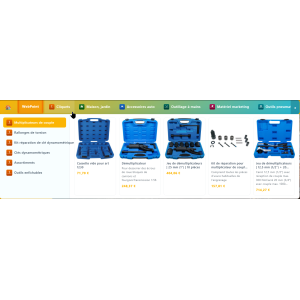





Tu en as marre de construire ton menu à la main ?Auto Menu est le module PrestaShop qui transforme ton mega-menu en machine 100 % automatique. Plus besoin de glisser-déposer pendant des heures : il détecte tout seul tes catégories, sous-catégories et produits. Fait pour :
Tu installes, tu choisis 2-3 réglages, et en 5 minutes chrono ton mega-menu est en ligne : animations 3D, panneaux déroulants avec images, sous-catégories et produits qui s'affichent au survol, largeur du panneau réglable en px ou en % du menu… tout est paramétrable depuis le back-office. Ce que tu obtiens :
Arrête de perdre ton temps. Laisse Auto Menu bosser à ta place. → |

Module WebPoint
Auto Menu — Mega-menu automatique en 5 min
Je l'achète maintenant →
Compatible PrestaShop 1.7 / 8 / 9 |
 Online Stores
 Online Services
 Chrome Extensions
 PrestaShop Modules
 Sites web sur mesure
 Windows Applications
Reference: WP-VI-CON-V1
Brand: WebPoint
Reference: BOUT-93K2X
Brand: WebPoint
Reference: EXT-CRMAX-MULTILANG
Brand: WebPoint
Reference: MCP-7X9Q2Z
Brand: WebPoint

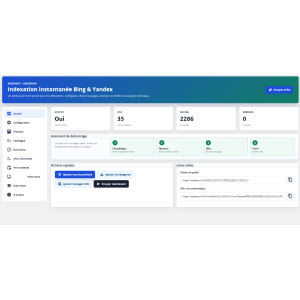

IndexNow Bing Yandex PrestaShop: improves SEO, content or compliance workflows with a focused tool built for cleaner store management.
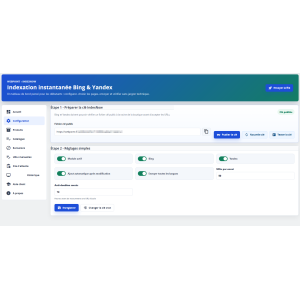
IndexNow PrestaShop SEO Module improves indexing for better visibility on search engines.IndexNow PrestaShop The module generates your IndexNow key, publishes the verification file, adds URLs to a secure queue, and sends them in Ajax batches to avoid server errors.
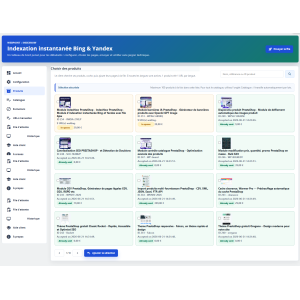
Designed for beginners, it offers a clear interface with selectable products, catalog submission, exclusions, history, HTTP statuses, and built-in help.
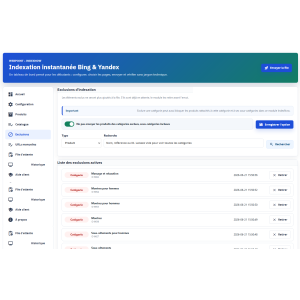
You keep control over languages, pages to send, recent duplicates, and items to exclude.
Ideal for PrestaShop stores that want to quickly notify their updates without technical handling.
IndexNow Bing Yandex PrestaShop: improves SEO, content or compliance workflows with a focused tool built for cleaner store management.
IndexNow PrestaShop is a module designed to help PrestaShop merchants quickly notify their URLs to IndexNow-compatible search engines, without technical knowledge and without file handling.
IndexNow PrestaShop allows your store to inform Bing and Yandex when an important page needs to be revisited. Instead of passively waiting for the next crawl, you send a structured notification containing the URLs to be explored.
The module does not promise immediate ranking in search results. It sends an official notification to compatible engines. When Bing or Yandex respond with an HTTP 200 or 202 code, it means the request has been accepted.
The interface is organized into simple tabs: Configuration, Products, Catalog, Exclusions, Manual URLs, Queue, History, Customer Help, and About. Each step is explained to guide non-technical users.
Important actions are performed without heavy page reloads: product search, adding to the queue, batch processing, progress tracking, exclusions, and viewing history.
URLs are first added to a queue. You then choose when to send them. This operation avoids timeouts and makes the module suitable for large catalogs.
Each notification is recorded with the engine, HTTP code, date, URL, and the origin of the send. The merchant can check what has been accepted or refused.
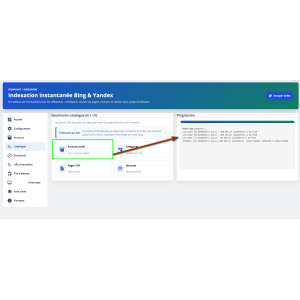
IndexNow PrestaShop does not load the entire catalog at once. Active products, categories, CMS pages, and brands are read in Ajax batches. This method reduces the risk of blank pages, timeouts, and server overload.
Example: a store with 10,000 products should not trigger a massive action in a single request. The module gradually scans the catalog and adds valid URLs to the queue.
If the store has several languages, the number of URLs can increase quickly. For example, 1,000 products with 9 languages can represent up to 9,000 URLs. The module displays this information to avoid unpleasant surprises.
The queue contains URLs ready to be sent. Adding a product or catalog does not mean Bing or Yandex have already been contacted. The actual sending occurs when the user clicks the process button or when the secure cron is executed.
The module may display only a snippet of the queue to preserve back-office performance. The queue counter shows the actual total of pending URLs.
After processing, the results are visible in the history with the relevant engine and the returned HTTP code.
To make the module easier to use, products display a visual status:

 play_circle_filled
 play_circle_filled
 play_circle_filled
 play_circle_filled
Reference: WPAUTO-MNU
Brand: WebPoint
Reference: WP-AGE-V3000-PRO
Brand: WebPoint
Reference: WPSHT-2026
Brand: WebPoint
Reference: MOD-COOK-BAR
Brand: WebPoint
Reference: DATASEO-ANALYZER
Brand: WebPoint
Reference: ECO-PKG-X723F
Brand: WebPoint
Reference: WPSL7-KR42M
Brand: WebPoint
Reference: clearance
Brand: WebPoint
recaptcha google gratuit : sécurisez votre boutique prestashop efficacement Dans le contexte actuel du commerce en...
Lire la suite : recaptcha google gratuit : sécurisez votre boutique prestashop efficacementcréer theme prestashop 1.6 : Guide complet pour un design ecommerce performant Pour les marchands souhaitant...
Lire la suite : créer theme prestashop 1.6 : Guide complet pour un design ecommerce performantbig data exemple : Optimisez votre ecommerce avec l’analyse avancée Le big data exemple est devenu un levier...
Lire la suite : big data exemple : Optimisez votre ecommerce avec l’analyse avancéeIndexNow Bing Yandex PrestaShop - professional SEO tool
Assurez-vous que votre boutique PrestaShop est correctement installée et fonctionnelle. Vérifiez que vous avez accès au back-office de PrestaShop avec les droits administrateur pour installer et configurer des modules.
Une fois le module installé, accédez à sa page de configuration via le menu "Modules". Le module est organisé en plusieurs onglets pour faciliter la configuration :
Après avoir configuré le module, commencez par ajouter quelques produits à la file d'attente pour tester le processus. Utilisez l'onglet "Historique" pour vérifier les statuts des notifications envoyées.
Consultez l'onglet "Aide client" pour des conseils sur les erreurs fréquentes. Vérifiez les codes HTTP retournés dans l'historique pour diagnostiquer les problèmes.
Le module est conçu pour fonctionner avec les versions récentes de PrestaShop. Assurez-vous que votre installation est à jour pour éviter les incompatibilités.
IndexNow Bing Yandex PrestaShop: improves SEO, content or compliance workflows with a focused tool built for cleaner store management.
IndexNow PrestaShop SEO Module improves indexing for better visibility on search engines.IndexNow PrestaShop The module generates your IndexNow key, publishes the verification file, adds URLs to a secure queue, and sends them in Ajax batches to avoid server errors.
Designed for beginners, it offers a clear interface with selectable products, catalog submission, exclusions, history, HTTP statuses, and built-in help.
You keep control over languages, pages to send, recent duplicates, and items to exclude.
Ideal for PrestaShop stores that want to quickly notify their updates without technical handling.